
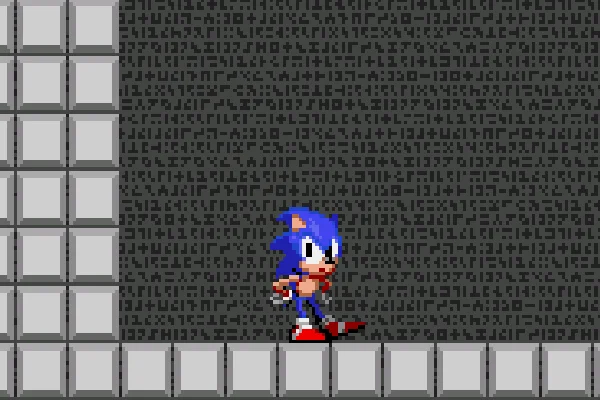
About Sonic VR
Sonic VR is a Sega Genesis ROM hack of Sonic the Hedgehog 2 created by ColinC10 and released in September 2011. It replaces the familiar Sonic adventure with 40 short platforming challenges organized through a computer-style interface. Each level tests a particular aspect of Sonic's movement, from precise jumping and momentum control to navigating enemies and unusual obstacles.
Forty Mini-Levels and Precision Platforming
Instead of running through large zones, players tackle compact stages designed around specific movement challenges. The objective is simple: reach the exit ring without dying.
Sonic VR removes several familiar mechanics from the original Sonic games. There are no collectible rings, shields, extra lives, time limits, or traditional boss battles. Success depends on understanding Sonic's physics and navigating each stage carefully.
Some levels focus on jumping between platforms, while others require precise timing, controlling momentum, or finding the correct path around hazards. A few challenges resemble small puzzles where experimenting with movement is necessary to discover the solution.
The difficulty increases as players progress, making later levels particularly demanding. Although many challenges are short, mastering their layouts can take several attempts.
Filesystem and Level Selection
The game uses an unusual menu system inspired by an old computer filesystem. Instead of selecting traditional zones, players choose from four sections named Filesystem 0 through Filesystem 3.
Each filesystem contains ten levels presented as individual files, such as LEVEL000.BIN, LEVEL001.BIN, and LEVEL002.BIN. Highlighting a file displays its level name near the bottom of the screen.
Filesystem 0 is available from the beginning. The remaining sections unlock after completing most of the levels in the previous filesystem, encouraging players to work through the challenges in order.
When a level is completed, a star appears beside its filename in the selection menu. This makes it easy to identify finished challenges and return to levels that still need to be cleared.
Progress is designed to be stored using SRAM, allowing completed levels and unlocked filesystems to be retained on compatible hardware or emulators.
Virtual-Themed Graphics and Custom Music
Despite its name, Sonic VR is not a virtual-reality game. The title refers to its simulated computer environment and abstract visual presentation.
The stages use custom graphics, unusual color palettes, and technological backgrounds rather than simply reusing the original Sonic 2 environments. Industrial platforms, geometric patterns, and robotic obstacles give the challenges a distinct appearance.
The soundtrack features music by Anamanaguchi, adapted for playback on the Sega Genesis. Different filesystems use different tracks, helping distinguish the sections as players progress.
To accommodate the large amount of music data, the hack uses a 6 MiB ROM with bank switching. Because of this unusual configuration, music playback and overall compatibility may vary between Genesis emulators.
How to Play and Complete Challenges
Start by selecting Filesystem 0 from the main menu, then choose one of the available level files. Each challenge begins immediately and places Sonic in a short stage with a specific platforming objective.
Use Sonic's running, jumping, and rolling abilities to overcome obstacles and reach the exit ring. Since ordinary rings and shields are absent, avoiding hazards is especially important.
If a level proves difficult, observe the terrain and experiment with the timing of your movements. Some challenges require building enough momentum before jumping, while others reward slower and more precise control.
To leave a level, pause the game and press the Sega Genesis A button to return to the level selection screen. You can then choose another challenge without restarting the entire game.
Continue clearing levels to unlock additional filesystems. The game does not use a traditional ranking system or final ending sequence; completing the challenges and filling the level list with stars provides the main sense of progression.
Basic Controls
- D-Pad: Move Sonic and navigate the filesystem menus.
- Genesis A, B, or C: Jump during gameplay and confirm applicable menu selections.
- Down while running: Roll into a ball.
- Start: Pause the game.
Challenge Controls
- Pause + Genesis A: Return to the level selection menu.
- Exit Ring: Reach the ring at the end of a stage to complete the challenge.
Note: Genesis A refers to the controller button, which may be mapped to a different keyboard key in the emulator.
Sonic VR Screenshots
ROM Information
- File name
- sonic-vr.bin
- File size
- 6,291,456 bytes (6144 KiB)
- Internal title
- SONIC THE HEDGEHOG 2
- Copyright (header)
- (C)SEGA 1992.SEP
- Product code
- GM 00001051-01
- Region
- JUE
File checksums
- CRC32
- FB36FB34
- MD5
- 154bfba923815d22acad8dcd5c7381dc
- SHA-1
- 8a3d287d4c714565e7ba59aa3019ec22d1e829ef
ROM header values may be inherited from the original game.
Frequently Asked Questions
Does Sonic VR require a VR headset?
No. Sonic VR is a traditional 2D Sega Genesis ROM hack. Its name refers to the game's virtual computer-themed presentation, not virtual-reality hardware.
How do you unlock more filesystems in Sonic VR?
Complete most of the ten levels in the current filesystem to unlock the next one. Cleared levels are marked with stars in the directory menu.